
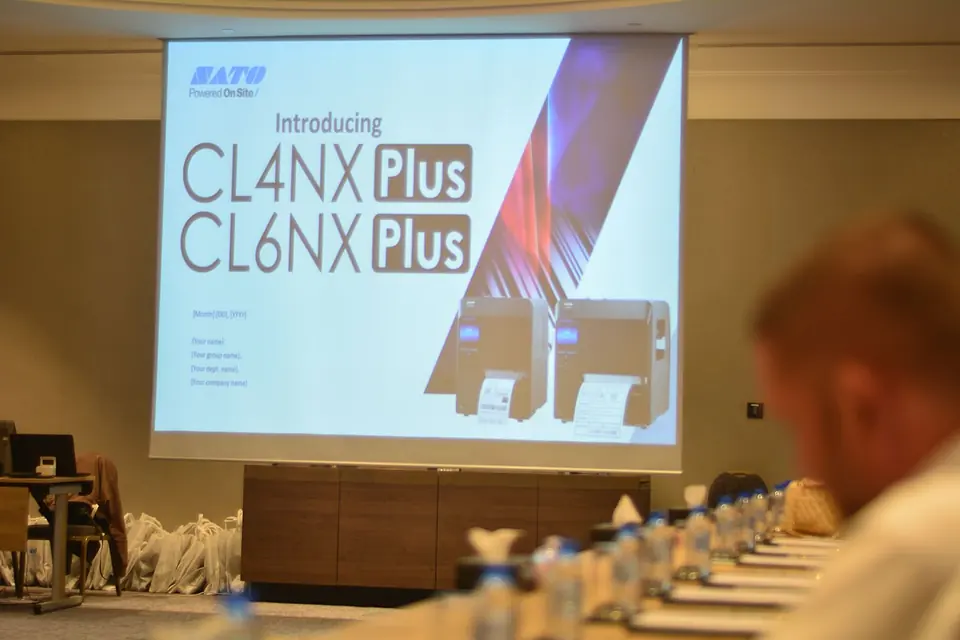
The NADA-TECH and SATO workshop brought partners and customers together at InterContinental Jordan in Amman for a working day on strategy, held in the Ayla room from 10:30 to 15:30. The programme covered our RFID asset management system module by module, the mobile cycle count and stock count app, and SATO's introduction of the CL4NX Plus and CL6NX Plus industrial printers, with printers, label rolls and RFID labels on the table for attendees to try.
Below is a recap of each session, and what it means if you are planning an RFID asset or inventory project in Jordan or elsewhere in the Middle East. Photos from the day are on the workshop event page.
The NADA-TECH and SATO workshop at a glance
- Venue: InterContinental Jordan, Ayla room, Amman
- Time: 10:30 to 15:30
- Format: a one-day strategy workshop for partners and customers
- Programme: the RFID asset management system, the mobile cycle count and stock count app, and the SATO CL4NX Plus and CL6NX Plus launch
- Hands-on: SATO printers, label rolls and RFID labels, including a demo of the PureLine platen roller
One chain, from label roll to report
An RFID project only works when two things work together: the system that holds the data and the printer that produces the labels. If labels are printed or encoded badly, counts fail. If the system is weak, even good labels produce reads that nobody can use. The workshop covered both ends of that chain: the asset management system and the mobile counting app on one side, and the printers that produce the labels on the other.
First session: the RFID asset management system, end to end
The first session walked through the RFID asset management system as six modules. Here is what each one covers in our system.
Tagging
Tagging gives every asset its identity. Each item is registered once, then an RFID label is printed with its name, number and barcode, and a unique EPC is encoded in the chip. Metal items such as cabinets, racks and machines take on-metal labels so they read reliably.
Data management
Data management holds the asset register itself: categories, brands, serial numbers, departments and custodians. It is the one list that counts, transfers and reports all work from, so cleaning it up is usually the first job in any project.
Location management
Location management describes your buildings as a path, for example site, building, floor and room. Every asset belongs to one location, and every count compares what the reader sees in a location with what is registered there.
Reader and hardware management
Reader and hardware management keeps track of the devices in the system: handheld readers used for counts, fixed readers at doors and gates, and the printers that produce the labels. Knowing which reader is where gives each read its meaning, because a read at a store room door says something different from a read in an office.
Asset validation and security
Asset validation confirms that an item is where it should be and that its tag belongs to a registered asset. On the security side, a fixed reader at a door can flag an item that leaves without a recorded transfer, which helps protect high-value equipment.
Notification system
The notification system tells the right people when something needs attention, for example when an item leaves an area it should stay in, or when a maintenance or calibration date is coming up.
For a sector view of how these modules work together, read our article on asset management for government and universities. The full feature list is on our asset management solution page.
The mobile cycle count and stock count app
The team then showed the mobile cycle count and stock count app, which counts a location with an RFID reader and lists what is missing.
In day-to-day use, the user chooses a location on an RFID handheld, holds the trigger and walks, and the app compares the tags it reads with what is registered there. As the count runs, the screen shows how many items are expected and how many have been read, then lists the registered items that were not found and any items that belong to a different location.
Because it handles both cycle counts and stock counts, the same app works for fixed assets and for stock. An office team can count meeting rooms and storerooms, and a shop or warehouse team can count tagged stock on shelves without scanning each item. Missing items can then be found by signal strength with the handheld. Our inventory management solution uses the same app and readers for stock counts.
SATO introduces the CL4NX Plus and CL6NX Plus
SATO then introduced its CL4NX Plus and CL6NX Plus industrial printers. The CL4NX Plus is the 4-inch model, and the CL6NX Plus is the 6-inch model for wider labels. The presentation covered the following features.
Compact bi-fold cover
The bi-fold cover folds as it opens, so the printer needs less space around it to open. That matters on crowded production lines and in tight print rooms, where a full lid might hit a shelf or a wall.
Integration with rewinders, applicators and barcode validators
Industrial printers rarely work alone on a line. SATO covered how the printers integrate with:
- Rewinders, which wind printed labels back onto a roll for later use or for another machine
- Applicators, which apply each label automatically to a product or carton as it passes
- Barcode validators, which check the quality of each printed barcode as it leaves the printer, so a poor label is caught before it reaches a customer
PureLine platen roller with wear indicator
The platen roller is the roller that presses the label and ribbon against the print head. As it wears, print quality drops, often slowly enough that nobody notices until barcodes stop scanning. The new PureLine platen roller has a wear indicator, so operators can see when it is due for replacement. Attendees had a hands-on demonstration of it on an industrial printer.
Hands-on with printers and labels
SATO industrial, desktop and compact printers were lined up alongside label rolls and RFID labels, so attendees could see the range side by side and try the printers for themselves. There was also time around the table to discuss RFID and printing projects with partners and customers.
How the pieces fit together
The sessions map neatly onto a real project:
- Register the assets or stock in the web console, with locations and custodians.
- Print and encode labels on an RFID printer. In its RFID configuration, the SATO CL4NX Plus prints the label face and writes the EPC to the chip in the same pass, and checks each chip before encoding.
- Tag each item, using on-metal labels where needed.
- Count locations with the mobile app and a handheld reader, and find missing items by signal strength.
- Act on alerts from the notification system, and report in English or Arabic.
NADA-TECH supplies the hardware, installs and configures the system, trains your team and supports it after go-live.
What it means for your project
- Choose printer width by label size. Most asset and shelf labels fit a 4-inch printer. Wider carton or pallet labels may need a 6-inch model.
- Plan the line, not only the printer. If labels are applied automatically or must be verified, include applicators and validators in the plan from the start.
- Plan for consumables and wear parts. Labels, ribbons and platen rollers are part of the running cost, and a wear indicator makes platen changes easier to schedule.
- Test labels on real items first. Test metal items in particular before you print thousands of labels.
Our guide on how to choose an RFID printer goes through these choices in more detail, and our SATO brand page lists the SATO printers and ribbons we supply in Jordan.
Frequently asked questions
Where was the NADA-TECH and SATO workshop held?
At InterContinental Jordan in Amman, in the Ayla room, from 10:30 to 15:30.
Which SATO printers were introduced?
The CL4NX Plus and CL6NX Plus industrial printers. SATO covered the compact bi-fold cover, integration with rewinders, applicators and barcode validators, and the PureLine platen roller with its wear indicator.
Can I see a demo if I missed the workshop?
Yes. We can show the RFID asset management system, the mobile count app and SATO printers at your site or at our office in Amman.
Where can I see photos from the day?
Photos of the sessions, the printers and the hands-on demos are on the workshop event page.
Arrange a demo
If you missed the NADA-TECH and SATO workshop and are planning an RFID asset management or stock counting project in Jordan or the region, or want to see a SATO CL4NX Plus print and encode your own labels, contact us and we will arrange a demo. You can also email sales@nada-tech.com or call +962 7 7766 8097.