
Count your stock, see what is missing
Today
What gets in the way
The stock count is the job everyone dreads: shelves counted by hand onto paper, totals typed into a spreadsheet, and a gap between the books and the shelf that nobody can explain. Between counts, you find out an item has run out when a customer asks for it.
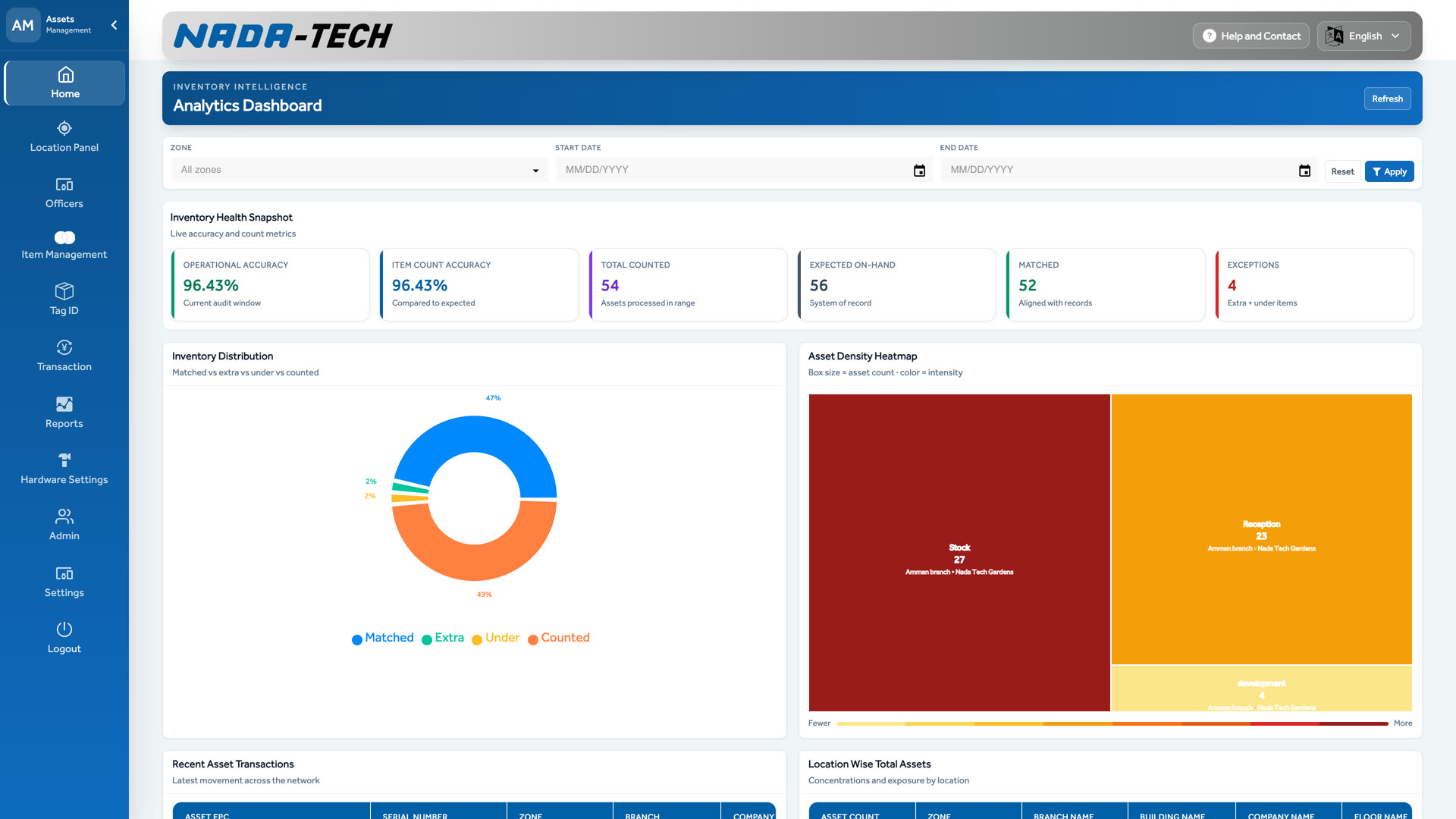
With an RFID or barcode inventory system, counting becomes part of the week instead of a yearly shutdown. Staff scan a shelf, or read a whole area with an RFID handheld, and the screen shows expected against counted while alerts flag low stock and items close to expiry. NADA-TECH supplies the readers, scanners, printers and labels and sets the system up with your team.
Counts that need the whole team
Counting by hand means extra shifts or closing early, so counts happen too rarely to catch problems in time.
Numbers nobody trusts
Typing tallies into spreadsheets adds errors, and differences between the books and the shelf stay unexplained.
Running out or expiring unseen
Without alerts, the first sign of low stock is an empty shelf, and short-dated items are found after they expire.
How it works
From tag to report
- 1
Label your items
Print barcode or RFID labels for products, shelves and storage areas on desktop or industrial label printers.
- 2
Count by area
Scan barcodes with a handheld, or read every RFID tag in an area with a handheld RFID reader.
- 3
Compare as you go
The count shows expected, counted, missing and extra items while you are still standing at the shelf.
- 4
Act on alerts and reports
Low-stock and expiry alerts point to what needs attention, and reports export to Excel and PDF.
What you get
Built for the people who use it
Cycle counts
Count one area at a time on any day, instead of stopping everything once a year.
RFID or barcode
Use barcode scanners where items are few, and RFID handhelds where you need to read many at once.
Expected against counted
See matched, missing and extra items live during the count.
Low-stock and expiry alerts
Get warned about items running low or close to their expiry date.
Excel and PDF reports
Export count results and stock reports for finance and management.
Shelf and product labels
Direct thermal, shelf-tag and scale labels supplied by us and printed on your own printers.
Hardware
Products for Inventory
 Chainway
UHF RFID handheld reader
Rugged Android handheld with a built-in UHF RFID reader and pistol grip, for stock counts, asset audits and linen tracking.
 Chainway
P80 RFID industrial tablet
8-inch rugged Android tablet with optional UHF RFID, barcode and NFC, for warehouse and inventory teams who need a larger screen.
 Zebra
Zebra TC22 with RFD40 RFID sled
Zebra TC22 Android mobile computer in an RFD40 UHF RFID sled, for asset counts, tag locating and maintenance rounds.

UHF RFID dry inlay
General-purpose UHF RFID inlay for converting into labels and tags for apparel, logistics, documents and assets.
 SATO
SATO CL4NX Plus RFID printer
SATO 4-inch industrial label printer that prints and encodes UHF or HF/NFC RFID labels in one pass.
 SATO
SATO CT4-LX RFID printer
SATO 4-inch desktop label printer with a touchscreen and optional UHF or HF/NFC RFID encoding, for shops, stock rooms and offices.
 SATO
SATO CG4 barcode printer
Compact 4-inch desktop label printer for shelf-edge, product, carton and file labels, in 203 or 305 dpi.
 GoDEX
GoDEX EZ120 desktop printer
Affordable 4-inch desktop printer at 203 dpi for price tags, product labels and shipping labels in shops and small warehouses.
Who uses it
- Supermarkets and grocery stores
- Pharmacies and medical stores
- Spare parts and hardware suppliers
- Food producers and distributors
- Hospital and company stores
Questions about Inventory
How is an RFID count different from a barcode count?
With barcodes, each item is scanned on its own and has to face the scanner. With RFID, a handheld reads all tagged items within range at once, even inside cartons, so a full shelf or rack is counted in a single pass.
Can we use the barcodes already on our products?
Yes. If your products carry manufacturer barcodes, scanners read them as they are. You only need to print labels for items, shelves or areas that do not have one.
Does it track expiry dates?
Yes. Items can be recorded with their expiry date, and the system flags those approaching it so you can move or use them first.
What hardware do we need to start?
Many sites start with a handheld scanner or RFID reader, a label printer and a stock of labels. We look at how many items and locations you have, recommend the right mix and install it.
Tell us what you need to track.
We reply within one working day with a recommendation and a price.